

Templates
What is 'template' in this plugin context?
Template - this is a special configuration file, that can be used for configure every chat without changes in global config.
You can use .yml or .json. Second option is experimental, so, if you use it - you may see bugs.
Modifing exists templates
For modify, we can use any file, in this example we're use one of defaults - global.yml
config:
  # <prefix> - Prefix from LuckPerms, <suffix> - same, but with suffix
  # <nickname> - player nickname. <m> - message
  prompt: "<dark_gray>[<green>+</green>]</dark_gray> <prefix><reset><gold><nickname></gold><suffix> <gray> >>> <m><reset>"
  cooldown: 1 # Cooldown in seconds.
blacklist:
  global: true #if set to false, plugin will read blacklist from this place. Else, it will read from config.yml
  # config:
  #   minimessage: false # Disables able for players for use minimessage. By default, set to false or Minimessage can be used.
  #   gradients: false # Disables able for players for use gradients. By default, disabled.
  #   tags: # Disables custom (and not only) tags.
  #     - newline
  #     - obf
As you can see, here we have config and blacklist. Every in their order. Inside config we can see prompt for global chat. Inside it it's uses some custom prefixes - <prefix>, <suffix> (both from LuckPerms), <nickname> with player nickname and <m> with player message.
For example we can try to change it to something like it
config:
  # <prefix> - Prefix from LuckPerms, <suffix> - same, but with suffix
  # <nickname> - player nickname. <m> - message
  prompt: "<dark_gray>[<green>GLOBAL</green>]</dark_gray> >>> <m><reset> - <prefix><reset><gold><nickname></gold><suffix>"
  cooldown: 1 # Cooldown in seconds.
# ... other sections ...
Here we changed order, and inside game we see it: Why? Because you need to reload plugin before see changes. We can do it with
 /lc reload (requires permission l-chat.reload)
And after, we see it! 
Now, we change blacklist for global chat.
# ... other sections ...
blacklist:
  global: true #if set to false, plugin will read blacklist from this place. Else, it will read from config.yml
 # config:
 #   minimessage: false # Disables able for players for use minimessage. By default, set to false or Minimessage can be used.
 #   gradients: false # Disables able for players for use gradients. By default, disabled.
 #   tags: # Disables custom (and not only) tags.
 #     - newline
 #     - obf
As we can see, section config are commented and there we use global blacklist, that defined in config.yml.
We need to do this:
# ... other sections ...
blacklist:
  global: false #if set to false, plugin will read blacklist from this place. Else, it will read from config.yml
  config:
    minimessage: false # Disables able for players for use minimessage. By default, set to false or Minimessage can be used.
    gradients: false # Disables able for players for use gradients. By default, disabled.
    tags: # Disables custom (and not only) tags.
      - newline
      - obf
Now, reload plugin and check for hover in global chat and in, for example, local.
When we try to type to local chat without permission "l-chat.full-format-use", we will see  In the same time, if we try to type same text in global:
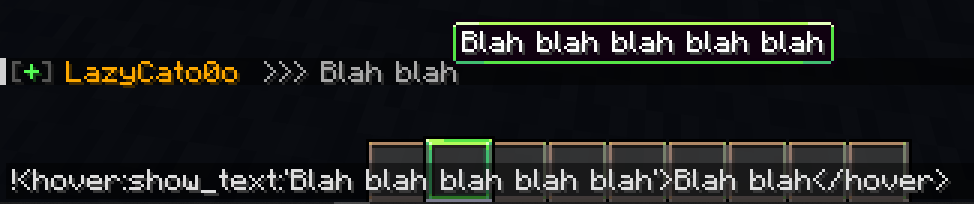 But, if we try to use
 <obf>...  Now, we return to default values everything:
# ... other sections ...
blacklist:
  global: true #if set to false, plugin will read blacklist from this place. Else, it will read from config.yml
 # config:
 #   minimessage: false # Disables able for players for use minimessage. By default, set to false or Minimessage can be used.
 #   gradients: false # Disables able for players for use gradients. By default, disabled.
 #   tags: # Disables custom (and not only) tags.
 #     - newline
 #     - obf
Create your own template for chat
In this section, we will...
YML chat template
At first, we need to know structure of .yml chat template.
#example-chat.yml
config:
  prompt: "[My chat] <prefix><nickname><suffix> -> <m><reset>"
  cooldown: 1
blacklist:
  global: true
This is minimal template for chat. Let's analyze the template structure.
config— Root of basic chat. Included prompt and cooldown.prompt— Text, that will be used for this chat when player send message.cooldown— Time, for what player cannot to send message in this chat. If not defined - using default fromconfig.yml
blacklist— Root of blacklist for tags (and not only) in chatglobal— Logical value, that says to plugin "Hey. I using global blacklist and not using my own". If set to true - chat will use blacklist fromconfig.yml. If set to false - chat will use their own blacklist
Now, we need to register it inside config.yml
#... other sections ...
chats:
  my-chat:
    template: "example-chat.yml"
    prefix: ["#", "_", "--"]
    radius: -1
Now. Let’s put everything in its place.
chats— Root for every registered chat. If you remove it - plugin will broked.my-chat— Name for your chat inside plugin. Players will not able to see it when they type in this chat.template— Path to your template of chat.prefix— Prefix for message, that players will need to type in this chat. Supports aliasesradius— Radius in blocks, players in this radius will see message. Ifradiusis set to -1 — everyone on server will see it.
Now, reload plugin.  in my case here 6 chats, not 4, because I already use .json experiment and using internal chats
And now, we can try to type inside our chat.  But what if we need more style? Let's change
 example-chat.yml
config:
  prompt: "<gray>[<red>My chat</red>]</gray> <prefix><gold><nickname></gold><suffix> <blue>-></blue> <m><reset>"
  cooldown: 1
blacklist:
  global: true
Now, prompt is "<gray>[<red>My chat</red>]</gray> <prefix><gold><nickname></gold><suffix> <blue>-></blue> <m><reset>". That means, about [] in start are gray, My chat inside them are red, player-nickname will be gold and -> will be blue. Let's try it. Reload plugin and after type a message 
You can change blacklist how you want. Here example.
blacklist:
  global: false #if set to false, plugin will read blacklist from this place. Else, it will read from config.yml
  config:
    minimessage: false # Disables able for players for use minimessage. By default, set to false or Minimessage can be used.
    gradients: false # Disables able for players for use gradients. By default, disabled.
    tags: # Disables custom (and not only) tags.
      - newline
      - obf
JSON chat template
As a first step, we NEED to enable support for JSON for chats inside config.yml
options:
  #...
  experiments:
    jsonForChats: true # <--- HERE. If here in your config false, change it to true.
    databasesForMute: false

# ... Other sections ...
Now, we can make new .json template.
At first, we need to know structure of .json chat template.
{
  "config": {
    "prompt": "[My chat] <prefix><nickname><suffix> -> <m><reset>",
    "cooldown": 1
  },
  "blacklist": {
    "global": true
  }
}
This is minimal template for chat. Let's analyze the template structure.
- "config" — Root of basic chat. Included prompt and cooldown.
- "prompt" — Text, that will be used for this chat when player send message.
- "cooldown" — Time, for what player cannot to send message in this chat. If not defined - using default from
config.yml
- "blacklist" — Root of blacklist for tags (and not only) in chat
- "global" — Logical value, that says to plugin "Hey. I using global blacklist and not using my own". If set to true - chat will use blacklist from
config.yml. If set to false - chat will use their own blacklist
- "global" — Logical value, that says to plugin "Hey. I using global blacklist and not using my own". If set to true - chat will use blacklist from
Now, we need to register it inside config.yml
#... other sections ...
chats:
  my-chat:
    template: "example-chat.json"
    prefix: ["#", "_", "--"]
    radius: -1
Now. Let’s put everything in its place.
chats— Root for every registered chat. If you remove it - plugin will broked.my-chat— Name for your chat inside plugin. Players will not able to see it when they type in this chat.template— Path to your template of chat.prefix— Prefix for message, that players will need to type in this chat. Supports aliasesradius— Radius in blocks, players in this radius will see message. Ifradiusis set to -1 — everyone on server will see it.
Now, reload plugin. in my case here 6 chats, not 4, because I using internal chats
And now, we can try to type inside our chat. But what if we need more style? Let's change example-chat.json
{
  "config": {
    "prompt": "<gray>[<red>My chat</red>]</gray> <prefix><gold><nickname></gold><suffix> <blue>-></blue> <m><reset>",
    "cooldown": 1
  },
  "blacklist": {
    "global": true
  }
}
Now, prompt is "<gray>[<red>My chat</red>]</gray> <prefix><gold><nickname></gold><suffix> <blue>-></blue> <m><reset>". That means, about [] in start are gray, My chat inside them are red, player-nickname will be gold and -> will be blue. Let's try it. Reload plugin and after type a message
You can change blacklist how you want. Here example.
  "blacklist": {
    "global": false,
    "config": {
      "minimessage": true,
      "gradients": false,
      "tags": [
        "newline", "obf", "b", "i"
      ]
    }
  }